
Long computer days can leave the neck, shoulders, and lower back feeling stiff or tired. Before buying an expensive chair or standing desk, review how your monitor, seat, keyboard, and daily movement routine fit your body.
There is no single “perfect posture” for everyone. Use these measurements as starting points, adjust for your height and vision, and change positions regularly.

1. Bring the Screen to You
Monitor placement affects how far you reach with your eyes and how often you bend or turn your neck. Start from a comfortable seated position—not from the height of the desk or monitor stand.
Step 1: Find your natural eye line
Sit back with your head facing forward and shoulders relaxed. Look straight ahead without lifting or dropping your chin. Use this horizontal line from your eyes as the reference.
Step 2: Set the screen height
The top of the visible display should be at or slightly below eye level. The center of the screen is usually viewed approximately 15–20° downward from horizontal eye level. Avoid settings that make you tip your chin up or bend your entire neck down to read.
Step 3: Adjust distance and font size
Start around 20–40 inches (50–100 cm) from your eyes, often near arm's length, and fine-tune for visual comfort. If text looks too small, increase browser zoom or display scaling before leaning forward. Larger screens may work better at the farther end of the range.
Step 4: Center the primary monitor
Line up the screen with your keyboard and torso. Keep frequently read content directly ahead rather than maintaining a sustained head turn. For two monitors, place your primary screen ahead of you; if both are used equally, position them closely together and angle them inward.
Step 5: Control glare
When practical, place the display perpendicular to bright windows; adjust blinds, screen brightness, and room lighting to avoid reflections and squinting.
Laptops and eyeglasses: For extended laptop use, raise the display and use an external keyboard and mouse. Bifocal or progressive-lens wearers may need a lower monitor to avoid tilting the head backward; an eye-care professional can advise on computer-specific lenses.
30-second check: Can you read the screen clearly while your back stays supported and your chin remains relaxed?
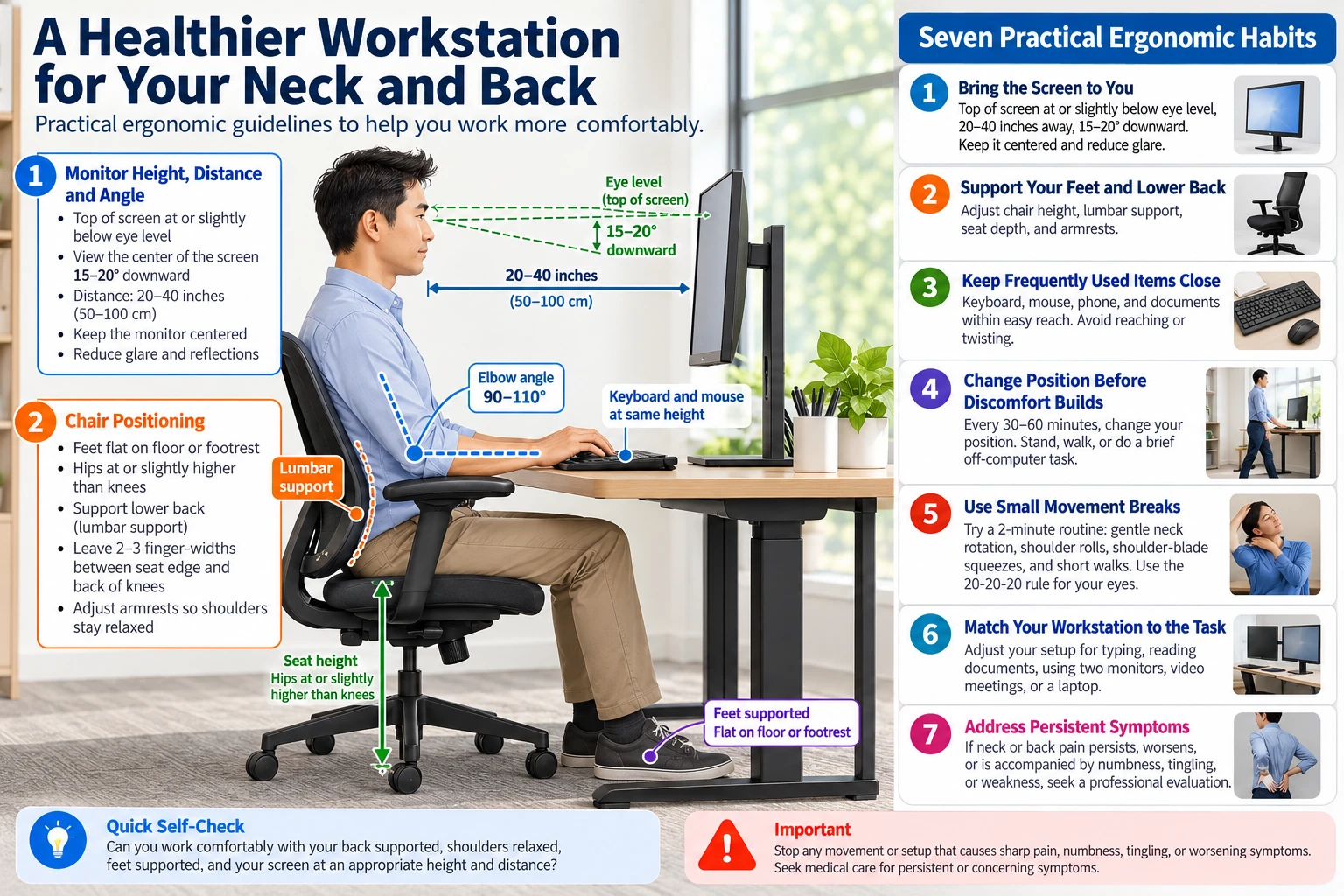
2. Support the Feet and Lower Back
A supportive chair should fit your legs and lower back while allowing you to move—not hold you in a single rigid sitting position.
Step 1: Adjust seat height
Set the chair so both feet are flat on the floor or on a stable footrest, with your thighs roughly parallel to the floor and knees comfortable near hip height. If raising the chair is necessary for typing, add a footrest rather than leaving your feet dangling.
Step 2: Check the seat depth
Sit against the backrest. Your thighs should be supported without the seat pressing against the backs of your knees. A practical starting point is approximately two to three finger-widths of clearance; adjust for your proportions and chair design.
Step 3: Position lumbar support
Set the backrest or lumbar pad to gently follow the natural curve of the lower back. It should feel supportive—not force you into an exaggerated arch. A small rolled towel may help temporarily if the chair lacks lumbar support.
Step 4: Relax your shoulders and armrests
Keep elbows close to your sides. Armrests may lightly support the forearms, but should not push the shoulders upward or keep the chair from approaching the desk. Adjust, lower, or remove interfering armrests where possible.
Step 5: Leave room to change position
A slight supported recline can be comfortable. Use a backrest that allows natural movement and avoid sitting perched forward all day.
30-second check: Are your feet supported, your lower back resting comfortably against the chair, and your shoulders relaxed?

3. Keep Frequently Used Items Close
Keyboard, mouse, phone, and document placement all affect reaching, wrist positioning, and sustained neck rotation.
Keyboard position
Center the keyboard with your torso. Adjust chair or keyboard height so elbows hang close to your body, forearms are approximately level, and wrists remain in line with forearms. An elbow bend around 90–110° may be comfortable for many users, but it is not a fixed requirement.
Mouse position
Keep the mouse immediately next to the keyboard and at a similar height. Use a mouse sensitivity that avoids repeated large reaches. If the mouse is beyond easy reach, move it closer rather than stretching your shoulder to reach it.
Phone placement
Keep the phone within easy reach. For longer calls, use a headset or speakerphone rather than pinching the phone between your ear and shoulder.
Document placement
For frequent data entry from paper, place a document holder near the monitor and at a similar comfortable viewing distance. This reduces repeated looking down to papers and back to the screen.
30-second check: Can you type, use the mouse, and view documents without elevating your shoulders or twisting your torso?
4. Change Position Before Discomfort Builds
Even a well-adjusted workstation can become uncomfortable when you remain in the same position too long. The aim is comfortable variation, not a universally perfect posture.
A workable movement schedule
Every 30–60 minutes: use a gentle reminder to change sitting position, stand, or briefly walk when your schedule permits. About once an hour: consider several minutes away from continuous computer work, such as a short walk or a non-screen task. These are planning suggestions rather than proven fixed prescriptions.
For standing desks
Alternate standing with sitting according to comfort. Begin with short standing periods if standing while working is new to you. Reset monitor and keyboard heights each time you switch modes; prolonged motionless standing can be uncomfortable too.
Make movement automatic
Stand during suitable calls, walk to refill water, or change posture after finishing a section of work. A movement break does not have to be a workout.
30-second check: Have you changed position or taken a brief walk in the last hour?
5. Use Small Movement Breaks
Use gentle motions within a comfortable range. Avoid forced stretching or movements that produce symptoms.
A practical two-minute routine
- Gentle neck rotation: slowly turn left and right, three comfortable repetitions each way, keeping your chin roughly level.
- Shoulder release: relax shoulders downward, then make five slow backward rolls.
- Shoulder blades: gently draw them toward each other, relax, and repeat five times without arching the lower back.
- Stand and walk: get up safely and walk for one to two minutes.
- Hands: gently open and close your fingers several times after prolonged keyboard or mouse use.
Give your eyes a break
Try the familiar 20-20-20 habit: after approximately 20 minutes of near-screen work, look at something about 20 feet away for 20 seconds. This is a comfort reminder, not a treatment for eye disease. Blink normally and reduce glare.
Stop if any movement causes sharp pain, dizziness, numbness, tingling, or worsening symptoms. Recent injuries, neurological symptoms, or medical restrictions require individualized advice.
6. Match the Workstation to the Task
Your setup should respond to what you are doing instead of requiring the same position during every activity.
When typing for extended periods
Prioritize supported seating, keyboard at comfortable elbow height, mouse close beside it, and wrists in a neutral alignment.
When using two monitors
Center the screen used most. If both are used equally, keep them adjacent and angled inward so you do not spend most of the day turning sharply to one side.
When working from paper
Raise printed material closer to your monitor's viewing height with a document holder instead of repeatedly bending toward papers spread across the desk.
When working from home on a laptop
For longer sessions, use a stable table, supportive chair, laptop riser, and separate keyboard and mouse. A couch or bed may be fine briefly, but usually offers little control over screen position and arm support.
When switching to standing
Recheck monitor and input-device heights to preserve a relaxed neck, shoulders, and wrists. Do not assume the seated heights remain appropriate.
30-second check: Does today's task fit the workstation, or are you constantly adapting your body to the equipment?
7. Address Persistent Symptoms
Ergonomic adjustments can improve comfort, but workstation position alone cannot diagnose the cause of neck or back pain. Symptoms may involve muscles, joints, nerves, vision, medical conditions, or injuries unrelated to desk work.
Arrange a clinical evaluation when:
- Pain persists, keeps recurring, or interferes with normal activities.
- Symptoms worsen despite reasonable adjustments or disturb sleep.
- You experience numbness, tingling, or weakness in an arm or leg.
- Symptoms follow a collision, fall, or other injury.
Seek urgent medical assessment for warning signs
New bowel or bladder dysfunction, numbness around the groin or saddle area, rapidly progressive weakness, or new severe walking or coordination difficulties warrant emergency evaluation. Severe symptoms after significant trauma also require urgent care. Fever, unexplained weight loss, or significant night pain with back or neck symptoms should prompt timely medical assessment.
Do not attempt to manage neurological warning signs solely with ergonomic exercises or workstation adjustments.
How ACE California Health Clinic may help
At ACE California Health Clinic in Santa Clara, an assessment can review symptoms, work habits, movement, and factors that aggravate discomfort. Depending on findings, clinically appropriate care may include chiropractic treatment, acupuncture, soft-tissue techniques, and rehabilitation exercises, along with individual workplace and home recommendations.
Questions or appointments? Call (408) 984-6000 or contact the clinic.
Start with the basics
Align the monitor, support your feet and lower back, keep your input devices close, and change positions before you become uncomfortable. Your workstation should fit your body and the task—not force your body to conform to poorly placed equipment.
Medical disclaimer: Educational guidance, not a diagnosis or individualized treatment plan. Seek appropriate medical care for persistent, worsening, or concerning symptoms, and emergency care for major neurological warning signs.
References and further reading
- OSHA — Monitor positioning and viewing angles
- OSHA — Chairs and back support
- OSHA — Keyboard positioning
- OSHA — Computer Workstations eTool
- Mayo Clinic — Office ergonomics
- Systematic review — exercise and workplace modifications for office neck pain
- Systematic review — exercise for office workers with neck pain